-a-complete-guide-to-modern-saas.jpg)
What is Software as a Service (SaaS): A Complete Guide to Modern SaaS
Gone are the days of buying a clunky software box off the shelf, installing it from a CD-ROM, and hoping your computer could handle it. Today, we live in a world of instant access, and that shift is powered by Software as a Service, or SaaS.
Think about it like this: you don’t buy a DVD collection anymore, you subscribe to Netflix. SaaS is the exact same idea, but for software. You’re not buying a product to own and maintain forever; you’re subscribing to a service that delivers a powerful application right through your web browser.
Decoding Software as a Service
At its heart, SaaS is a radical change in how we get our hands on digital tools. The old way involved buying a software license, installing it locally, and being personally responsible for every single update, patch, and maintenance headache. It was a chore.
The SaaS model flips that script entirely. You essentially “rent” access to the software. The company providing it—the SaaS vendor—handles absolutely everything behind the scenes. They manage the servers, the databases, the code, and the security. All you have to do is log in, and the latest, most secure version is always there waiting for you.
From Ownership to Access
This move from owning a product to accessing a service has been a game-changer, knocking down barriers that once kept powerful software out of reach for many. It’s built on a few simple, powerful ideas:
- Subscription-Based Pricing: Instead of a huge upfront cost, you pay a predictable monthly or annual fee. This makes budgeting a breeze for businesses and creates a steady, reliable revenue stream for the provider.
- Centralized Hosting: The software lives on the provider’s powerful cloud servers, not your laptop. This means you can log in and get to work from anywhere in the world, on almost any device with an internet connection.
- Automatic Updates and Maintenance: Forget about “update available” pop-ups. The provider pushes out all bug fixes, security patches, and new features automatically. Everyone is always on the same, up-to-date version without lifting a finger.
- Scalability on Demand: Need to add 10 new team members? Or maybe scale back during a slow season? With SaaS, you can adjust your plan and user count in a few clicks, only ever paying for what you actually need.
This diagram breaks down the basic flow. The provider takes care of all the heavy lifting, so you can just focus on using the tool.
As you can see, all the technical spaghetti—the servers, the updates, the databases—is handled for you. It’s a much simpler, more efficient way to work.
To really grasp the difference, it helps to see the two models side-by-side. The old on-premise world feels ancient compared to the flexibility of SaaS.
SaaS vs Traditional On-Premise Software At a Glance
| Feature | Software as a Service (SaaS) | Traditional On-Premise Software |
|---|---|---|
| Hosting | Hosted on the provider’s cloud servers. | Installed on your own local servers and computers. |
| Pricing | Recurring subscription fee (monthly/annually). | One-time perpetual license fee, often with large upfront costs. |
| Updates | Automatic and seamless, managed by the provider. | Manual. You are responsible for downloading and installing updates. |
| Maintenance | Handled entirely by the provider. | Your IT team is responsible for all server and software maintenance. |
| Accessibility | Accessible from any device with an internet connection. | Limited to devices where the software is physically installed. |
| Scalability | Easily scale users and features up or down as needed. | Difficult and expensive to scale; requires new hardware and licenses. |
| Initial Cost | Low. No hardware or major setup fees. | High. Requires investment in servers, infrastructure, and licenses. |
The table makes it clear: SaaS is all about agility, lower upfront costs, and letting you focus on your business, not on becoming an IT expert.
The Scale of the SaaS Revolution
The shift to SaaS isn’t just a trend; it’s a complete takeover. The industry’s growth has been absolutely explosive, cementing its place as the default way modern software is delivered.
The global market was valued at a staggering $390.46 billion in 2025, a figure that speaks volumes about how deeply this model has been adopted. And it’s not slowing down. Projections show SaaS will account for 85% of all business software by the end of 2025. You can dive into more SaaS industry statistics to see just how massive this movement has become. It’s a clear signal that businesses everywhere are choosing flexibility and efficiency over the old, rigid ways of doing things.
The Architecture Powering Modern SaaS
To really get what SaaS is, you have to look under the hood. The core idea isn’t brand new—you had things like Application Service Providers (ASPs) back in the 1990s. But those early models were often clunky, expensive, and never really took off, mostly because internet speeds and the underlying tech just weren’t there yet.
Modern SaaS blew past those early attempts by nailing one key architectural principle: multi-tenancy. This is the secret sauce. It’s what makes the entire model efficient, scalable, and affordable.
This diagram shows the night-and-day difference between a cloud-based SaaS setup and the old-school on-premise way of doing things.
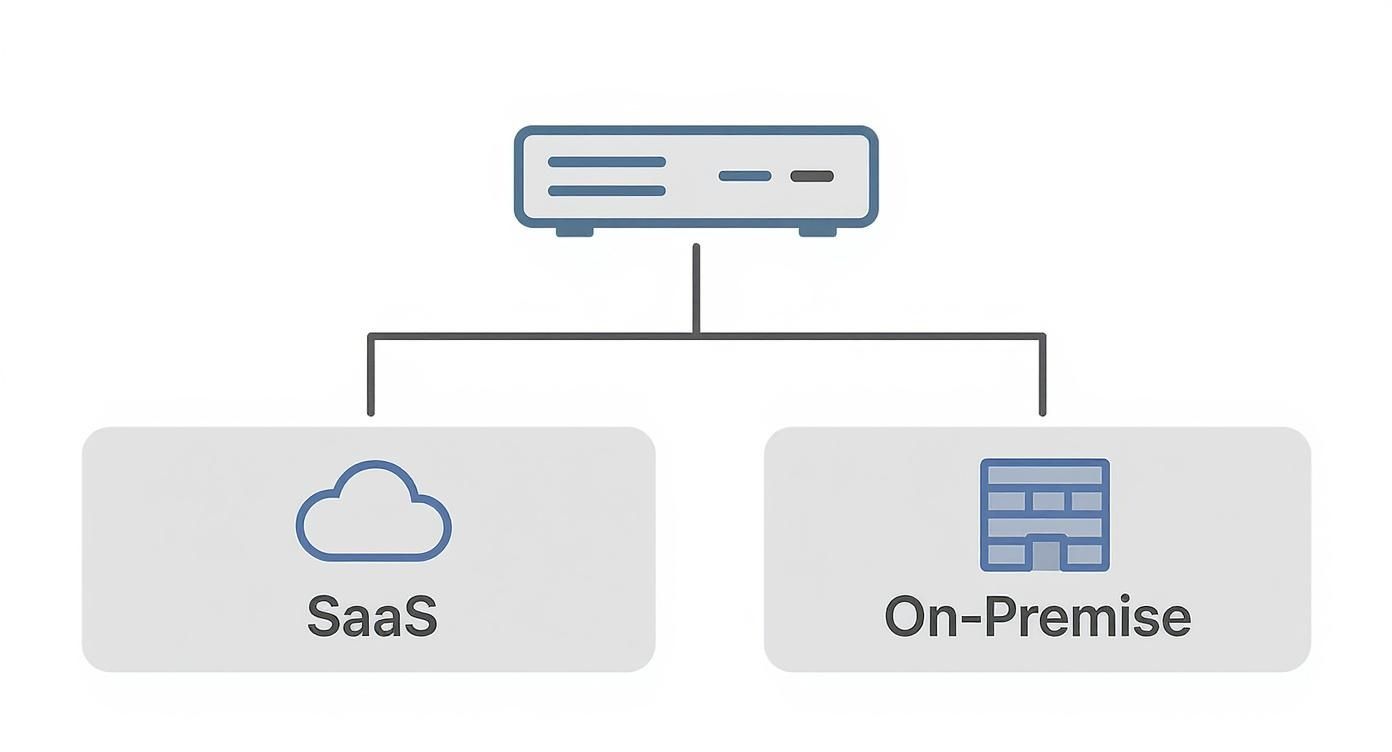
As you can see, SaaS centralizes everything in the cloud, serving all its users from one place. The on-premise model forces every single company to build and maintain its own separate, isolated island of infrastructure.
The Apartment Building Analogy
Here’s a simple way to think about it: imagine a SaaS application is a massive, modern apartment building. The building itself—the foundation, plumbing, electrical, the works—is the core software and all the hardware it runs on. A single company (the SaaS provider) builds and maintains this one huge resource.
Each customer, or “tenant,” gets to rent their own apartment. They have a private, secure space that nobody else can get into (that’s their data and unique settings). But here’s the key: every tenant shares the building’s main utilities—the water, electricity, and heating. It’s an incredibly efficient way to live.
Instead of every family building their own house from scratch, complete with a personal power plant and water well, they all share the cost and upkeep of a single, highly optimized system. That’s the essence of multi-tenancy.
This shared model is what slashes costs and makes maintenance a breeze for the provider. They only have to manage one application, one set of servers, and one core database, then pass all those savings and efficiencies down to thousands of customers. This economic advantage is what lit the fuse for the SaaS industry’s explosion.
The scale is staggering. As of early 2023, North America alone had roughly 17,000 SaaS companies in the U.S. and another 2,000 in Canada. Together, they serve a mind-boggling 14 billion users around the globe.
Different Models of Multi-Tenancy
Now, not all multi-tenant setups are identical. While the apartment analogy gets you 90% of the way there, SaaS providers can slice things up in a few different ways. Each approach comes with its own trade-offs on cost, security, and complexity. For a deeper dive, check out our complete guide to multi-tenant SaaS architecture.
Here are the most common flavors you’ll run into:
- Shared Database, Shared Schema: This is the most cost-effective and common model. All tenants share one database and the exact same data tables. A special “Tenant ID” is added to every row to keep everyone’s data separate. It’s super efficient but relies on bulletproof application code to prevent one tenant from accidentally seeing another’s data.
- Shared Database, Separate Schemas: A good middle ground. All tenants are on the same database server, but each gets their own private set of tables (a “schema”). This creates a much stronger wall between tenants’ data while still sharing the expensive server resources.
- Separate Databases: This is the Fort Knox model—the most isolated and secure. Every single tenant gets their very own dedicated database. It completely separates their data from everyone else’s, but it’s also the most expensive and complicated for the provider to manage.
Choosing the right model is one of the most critical decisions a SaaS founder has to make early on.
Why This Architecture Matters for You
Okay, so why should you care about any of this technical jargon? Because understanding multi-tenancy explains why SaaS works the way it does. This architecture is the engine that delivers all the benefits you enjoy.
Since the provider is managing a single system for everyone, they can push out updates, bug fixes, and security patches to all users instantly and simultaneously. You’re always on the latest and greatest version, no effort required. Better yet, all that resource pooling is what allows them to offer incredibly powerful software for a low monthly fee, a fraction of what a traditional software license used to cost.
At the end of the day, this efficient, scalable architecture is what makes modern software so accessible, giving tiny startups access to the same powerful tools that were once reserved for the Fortune 500.
Why Founders Are Building on the SaaS Model
The architectural elegance of SaaS is more than just a tech detail—it’s the engine that completely changed the software business. Founders and investors are flocking to the SaaS model, not just because it’s a trend, but because it unlocks strategic advantages that were simply out of reach with old-school, on-premise software.
At its core, SaaS transforms the entire relationship between a business and its customers, paving a much more sustainable and scalable path to growth.
For founders, the magic starts with one powerful concept: predictable recurring revenue. Gone are the boom-and-bust cycles of one-time software sales. A subscription model delivers a steady, reliable stream of income.
This predictable cash flow, measured as Monthly Recurring Revenue (MRR) and Annual Recurring Revenue (ARR), is the lifeblood of a modern software company. It makes financial forecasting accurate, budgeting smarter, and provides a stable foundation to build upon, making the business wildly attractive to investors.
The table below breaks down the key benefits that make the SaaS model so compelling for both the business and the teams building the product.
Key Benefits of SaaS for Businesses and Tech Teams
A summary of the primary advantages offered by the SaaS delivery model, categorized by their impact on business strategy and technical operations.
| Benefit Type | Key Advantage | Impact |
|---|---|---|
| Business | Predictable Recurring Revenue | Enables stable financial forecasting, sustainable growth, and higher company valuations. |
| Business | Global Market Access | Removes geographical barriers, allowing sales to customers anywhere in the world from day one. |
| Business | Lower Customer Barrier to Entry | Subscription pricing makes adoption easier and shortens sales cycles compared to large upfront costs. |
| Business | Rapid Feedback & Iteration | A direct line to user behavior allows for data-driven product improvements and quick pivots. |
| Technical | Centralized Codebase | Simplifies maintenance and updates; one fix or feature release benefits all users instantly. |
| Technical | No Client-Side Installation | Eliminates customer support headaches related to installation, compatibility, and updates. |
| Technical | Rich User Analytics | Provides invaluable data on feature usage and user friction, informing the product roadmap. |
These benefits create a powerful cycle where business strategy and technical execution reinforce each other, driving faster innovation and growth.
The Business Case for SaaS
The stability of recurring revenue is just the tip of the iceberg. The SaaS model offers a powerful mix of scalability and market access that levels the playing field, empowering small startups to compete head-on with established giants. This is all possible because the centralized, cloud-based delivery method tears down traditional barriers to entry.
Here’s why it’s such a game-changer for business:
- Global Reach from Day One: Because the software is delivered online, a founder in a garage can sell their product to a Fortune 500 company across the globe as easily as to a local shop. No supply chains, no shipping logistics, no physical distribution to worry about.
- Lower Upfront Costs for Customers: The subscription model replaces a massive one-time purchase with a small, manageable monthly fee. This dramatically lowers the barrier to adoption and can shrink the sales cycle from months to days.
- Rapid Iteration and Feedback: Since every user is on the exact same version of the software, founders can gather data, test features, and adjust their strategy based on real-world usage in near real-time.
This continuous feedback loop is a founder’s greatest asset. Instead of spending a year building a product in a vacuum, SaaS creates a constant conversation with the market, ensuring the product evolves to solve real customer problems.
Getting a product to market fast is everything. That’s why learning how to develop a SaaS MVP users actually want is the critical first step, and the SaaS model makes it far more achievable.
The Technical Advantages Fueling Innovation
While the business logic is compelling, the SaaS model is just as appealing to the developers and engineers on the ground. It dramatically simplifies their workflow, cuts out tedious maintenance, and gives them the tools to build better software, faster. By getting rid of the headaches of old-school deployment, it frees up tech teams to focus on what actually matters: innovation and user experience.
Here are the core technical wins:
- A Single, Centralized Codebase: Developers only have to maintain one version of the application. Period. When a bug is fixed or a feature is shipped, it’s deployed once and instantly available to every single customer. This kills the nightmare of supporting dozens of legacy versions across different operating systems.
- Zero Client-Side Installation: The endless support tickets about installation failures, system incompatibilities, and update problems just vanish. The software simply works in the browser, saving countless hours for both support and dev teams.
- Rich User Data and Analytics: With all users on one central platform, tech teams can collect a treasure trove of data on how the product is being used. This insight is gold for identifying popular features, pinpointing friction points, and making data-driven decisions for the product roadmap.
By aligning the business and technical workflows, the SaaS model creates a powerful, self-reinforcing cycle of growth and improvement that old software models just can’t match.
The Must-Have Features of Any SaaS Product
While every SaaS product solves a unique problem, the successful ones are all built on the same handful of non-negotiable features. Think of them as the plumbing and electricity of your SaaS house. Without them, even the most brilliant idea will fall flat.
Getting these fundamentals right is what separates a professional-grade product from a weekend hobby project. They fall into three buckets: how users get in, how you get paid, and how customers actually succeed with your tool. Nail these, and you’ve got a solid base for a scalable business.
Identity and Access Management
The very first thing a new user does is try to get into your app. Identity and Access Management (IAM) is the digital bouncer at the front door, handling everything from simple sign-ups to complex team permissions. This isn’t just about a login box; it’s a critical layer for both security and user experience.
At a bare minimum, your IAM system has to handle:
- Authentication: Securely proving a user is who they say they are. This means standard email/password, social logins (like Google or GitHub), and multi-factor authentication (MFA) for that extra layer of security.
- Authorization: Deciding what an authenticated user is allowed to see and do. This is where you implement role-based access control (RBAC), making sure an “admin” can do more than a “viewer.”
- User Management: Giving users a way to manage their own profiles and reset passwords, and letting admins invite or kick out team members.
Getting IAM wrong can be catastrophic. It’s a massive security risk. In fact, security leaders have pointed out that attackers are now actively targeting trusted third-party integrations, making robust authentication a top priority from day one.
The question isn’t whether you need these features, but whether you should build them from scratch or use a battle-tested third-party service. Building your own auth system is a massive undertaking fraught with security risks.
Services like Auth0, Clerk, or Supabase Auth offer complete, secure solutions right out of the box. They’ve already solved the nasty problems of password hashing and session management, saving you months of work so you can focus on what makes your product unique.
Billing and Subscription Management
If IAM is the front door, billing is the cash register. A smooth, trustworthy payment system is make-or-break for any commercial SaaS. The reality is that handling recurring payments, different pricing tiers, and failed charges is a complex mess. Customers have zero patience for billing errors.
A solid billing system needs to juggle several jobs:
- Subscription Logic: Managing recurring monthly and annual payments, handling trial periods, and processing upgrades or downgrades between your plans.
- Payment Processing: Securely integrating with a payment gateway like Stripe or Braintree to handle credit card transactions.
- Dunning Management: Automatically dealing with failed payments by retrying charges and bugging customers to update their card info. This is absolutely critical for fighting churn.
- Invoicing and Taxes: Generating invoices and correctly handling sales tax, which can be a legal minefield. Rules vary wildly; some states like Massachusetts tax SaaS, while others like Georgia do not.
Trying to manage subscriptions with a spreadsheet is a recipe for disaster. This is another area where the “buy, don’t build” philosophy almost always wins.
The “Build vs. Buy” Decision for Core Features
| Feature | Building In-House (Pros & Cons) | Using a Third-Party Service (Pros & Cons) |
|---|---|---|
| IAM | Pro: Total control over UX. Con: Extremely high security risk, long development time, ongoing maintenance. | Pro: Enterprise-grade security, fast implementation, handles edge cases. Con: Monthly cost, less UX control. |
| Billing | Pro: No transaction fees. Con: Huge PCI compliance burden, complex logic, high maintenance. | Pro: PCI compliance handled, reliable, feature-rich (dunning, taxes). Con: Transaction fees, reliance on provider. |
| Support | Pro: Deeply integrated experience. Con: Requires building a full ticketing/chat system from scratch. | Pro: Deploys in minutes, dedicated features, scales easily. Con: Monthly cost, data lives on another platform. |
For billing, services like Stripe Billing and Chargebee are the industry go-tos. They give you pre-built tools and APIs that manage the entire subscription lifecycle, saving you from the enormous headache and liability of building it yourself.
User Onboarding and Support
You could have the greatest product in the world, but if users can’t figure it out, they will leave. Simple as that. Effective user onboarding is all about guiding new customers from “What is this?” to that “Aha!” moment as quickly as possible. This is how you turn curious sign-ups into loyal customers.
This final pillar is about helping users win. It includes things like:
- Guided Onboarding: Interactive product tours, setup checklists, and welcome emails that teach users the ropes.
- In-App Help: An easy-to-find knowledge base, FAQs, and chat support baked right into your app.
- Proactive Support: Using analytics to spot users who are stuck and reaching out with a helpful tip before they get frustrated.
Tools like Intercom, Crisp, or Tawk.to can add a powerful live chat and help desk to your app with just a few lines of code. They open a direct line to your users, which is invaluable for getting feedback and stopping churn in its tracks. These foundational features—IAM, billing, and support—are the bedrock of any serious SaaS product.
The Future of SaaS: AI and Vertical Niches

The SaaS model completely changed how we build and sell software, but the game is changing again. Two massive trends are redefining what a successful SaaS looks like, moving us away from generic tools and toward intelligent, specialized partners. For founders paying attention, this is where the real opportunity is.
The first, and most obvious, shift is the deep integration of Artificial Intelligence. AI is no longer a bolt-on feature or a marketing buzzword; it’s becoming the engine of modern SaaS products. We’re creating software that doesn’t just store information but actually understands it, automating workflows and surfacing insights that were science fiction a decade ago.
The Rise of Intelligent SaaS
AI turns a standard application into a proactive assistant. Instead of waiting for you to click a button, an AI-powered SaaS anticipates your needs and gets the work done for you. This isn’t just a cool feature—it’s a huge economic driver.
The AI-powered slice of the SaaS market was already valued at around $101.73 billion in 2025. What’s more telling is that about 70% of SaaS companies with AI are already testing or monetizing these capabilities. You can get a deeper dive into the impact of AI on the SaaS market and see just how fast it’s growing.
So, what does this look like in the real world?
- Predictive Analytics: An AI-infused CRM doesn’t just show you a list of leads. It predicts which ones are most likely to convert, telling your sales team exactly where to focus their energy.
- Intelligent Automation: Forget manually sorting support tickets. An AI can read, understand, and automatically route incoming requests to the right person without any human intervention.
- Deep Personalization: A marketing tool can craft unique email campaigns for thousands of users based on their individual behavior—not just by inserting their first name.
By weaving AI into their core product, SaaS companies are building a powerful moat. Their tools get smarter, more efficient, and more valuable with every use, making them almost impossible to replace.
Vertical SaaS: Going Deep, Not Wide
The second major trend is the pivot away from broad, one-size-fits-all tools toward hyper-focused platforms. This is the world of Vertical SaaS, where founders build software to solve the deep, specific problems of a single industry.
Here’s a simple way to think about the difference:
Horizontal SaaS is like a Swiss Army Knife. A tool like Slack or Dropbox is useful for almost any company, whether it’s a law firm or a creative agency. They solve common problems but don’t get into the nitty-gritty of any single industry.
Vertical SaaS is like a surgeon’s scalpel. It’s a tool designed with extreme precision for one job. Think of a construction management platform or a dental practice software—they solve specific workflow, compliance, and operational headaches that a general-purpose tool could never touch.
By going deep into a niche like agriculture, legal tech, or logistics, vertical SaaS providers create immense value. They speak their customers’ language, understand the regulations that keep them up at night, and build features that solve their biggest pain points.
This focus creates an incredible business advantage. Vertical SaaS products often face less competition, can charge premium prices, and build “sticky” relationships with customers who literally can’t run their business without them. For founders, the future isn’t just about building another piece of software—it’s about building an intelligent, industry-specific solution.
How to Choose the Right SaaS Solution
Picking the right SaaS solution is a huge decision, one that goes way beyond just ticking off features on a comparison sheet. You’re not just buying software; you’re choosing a strategic partner. Get it right, and their tech helps you grow. Get it wrong, and you’ve just created a whole new set of headaches for your team.
The trick is to have a clear game plan that puts stability, security, and real long-term value ahead of a flashy demo. Before you even talk to a salesperson, you need to know exactly what your non-negotiables are. What problems are you actually trying to solve? Which features are mission-critical, and which are just nice to have?
Key Evaluation Criteria
To make a call you won’t regret later, zero in on three core areas. This is where you’ll find the real story about a SaaS provider’s quality and whether they’re a good fit for your business.
- Security and Compliance: This one’s a deal-breaker. Don’t just take their word for it. Ask for proof, like SOC 2 or ISO 27001 certifications. If you’re dealing with data from European customers, GDPR compliance isn’t optional—it’s a must.
- Integration Capabilities: A great tool can’t live on an island. It has to play nice with the tech you already use every day. Look for solid APIs and, even better, pre-built integrations with your CRM, accounting software, or whatever else is critical to your workflow. A tool that creates data silos often makes more work than it saves.
- Total Cost of Ownership (TCO): That monthly subscription fee? That’s just the starting line. You have to factor in the one-time setup fees, the cost of migrating your data, and the time it’ll take to train your team. A cheaper sticker price can get real expensive, real fast if the software is a nightmare to adopt.
Choosing a SaaS solution is like hiring a key employee. You need to ensure they are trustworthy (security), can collaborate with the team (integration), and will provide a positive return on investment (TCO).
Overcoming Common Hurdles
Even when you find the perfect tool, making the switch isn’t always seamless. The two biggest tripwires are almost always data migration and getting your team to actually use the new software. If you don’t plan for these from the very beginning, you’re setting yourself up for a rocky rollout.
For founders who are building their own product, getting the foundation right from the start is everything. It can be incredibly helpful to explore a well-structured SaaS template just to see how core components like security, billing, and user management are supposed to work together from the ground up.
Finally, remember that user adoption is where the real ROI happens. The best way to get buy-in is to involve your team in the decision-making process early on. Once you’ve made a choice, invest in proper training and be ready to offer support as everyone gets up to speed. A successful launch isn’t just about flipping a switch; it’s about giving your team the tools and confidence they need to win.
Frequently Asked Questions About SaaS
Even after you’ve got the basics down, a few practical questions always pop up. Let’s tackle the most common ones we hear, clearing up the confusion around architecture, who owns what, and whether your data is actually safe.
What Is the Main Difference Between SaaS PaaS and IaaS
Let’s stick with the pizza analogy. It’s the easiest way to get this straight. Each “as a Service” model is just a different level of doing it yourself versus having it done for you.
- IaaS (Infrastructure as a Service): This is like the pizza place handing you an oven, flour, and tomatoes. You’re making everything from scratch with their raw ingredients. Think of providers like Amazon Web Services (AWS) or Microsoft Azure.
- PaaS (Platform as a Service): This is like getting a take-and-bake pizza. The dough and sauce are ready, but you get to add your own toppings and bake it yourself. This is what platforms like Heroku or Vercel offer developers.
- SaaS (Software as a Service): This is ordering a pizza for delivery. It shows up at your door, fully cooked and ready to eat. No work required. This is Slack, Notion, or Google Workspace.
SaaS is the finished, ready-to-use application. PaaS and IaaS are the building blocks developers use to create their own applications.
Who Owns the Data in a SaaS Application
This one is critical: You—the customer—own your data. At least, that’s how it should be with any reputable provider. The SaaS company is just a custodian, responsible for keeping your information secure and available to you.
Always, always read the Terms of Service to confirm their data ownership and export policies. A trustworthy provider will state in plain English that you retain full ownership and can take your data with you if you ever decide to leave. If they don’t, that’s a huge red flag.
Is SaaS Secure Enough for Sensitive Business Data
For the most part, yes. In fact, it’s often more secure. Major SaaS providers invest far more in security and compliance than a single small or medium-sized company ever could. They have entire teams dedicated to managing threats and maintaining critical certifications like SOC 2 or ISO 27001.
But it’s not a one-way street. Security is a shared responsibility. While the provider secures the platform itself, your organization is responsible for how you use it. That means enforcing strong passwords, configuring user permissions correctly, and using multi-factor authentication everywhere you can. The best lock in the world won’t help if you leave the key under the doormat.
Ready to stop wrestling with DevOps and start building your product? saasbrella gives you a production-grade, AI-ready foundation so you can launch in minutes, not months. Get started on saasbrella
Ready to build?
Get Started for Free. Build on a production-ready foundation with authentication, database, and deployment already configured.
No credit card required. Cancel anytime.