Build Faster with a SaaS Template Your Ultimate Guide
Think of a SaaS template as the pre-built foundation for a house. It gives you all the essential, non-negotiable stuff right out of the gate: the concrete slab, the plumbing, the electrical wiring. For software, this means features like user authentication, billing systems, and the initial database setup.
This lets you, the founder or developer, skip months of tedious, repetitive work. Instead of digging the foundation by hand, you can start framing the walls and designing the rooms—building the unique features that actually solve your customers’ problems.
Build Your SaaS Without Starting from Scratch
Launching a software product is a race. You’re fighting against the clock and battling for every sliver of market attention. The pressure to ship is real, and every single day you spend on backend plumbing is a day you’re not getting in front of users.
Let’s use an analogy. Imagine you’re an architect hired to design a groundbreaking new skyscraper. Would you start by forging your own steel beams from raw iron ore? Of course not. That would be insane. You’d use a proven blueprint and pre-fabricated structural parts for the foundation and core systems. This frees you up to focus on the innovative design that makes the building iconic.
A SaaS template is that architectural blueprint for your software. It handles the heavy lifting—authentication, payments, infrastructure—so you can pour all your energy into building the unique, value-driven features that truly matter.
This isn’t about taking a shortcut; it’s about getting a smart start. It’s a massive head start in a cutthroat market where speed and focus are everything.
To give you a clearer picture, here’s a quick rundown of what you gain.
SaaS Template At a Glance: Key Benefits
| Benefit | Impact on Your Project |
|---|---|
| Launch in Weeks, Not Months | Get your MVP to market faster to start validating your idea and gathering feedback. |
| Slash Development Costs | Avoid spending thousands on engineers reinventing common features like login and payments. |
| Focus on Your Core Idea | Dedicate your time and resources to the unique features that solve your customers’ problems. |
| Built on Best Practices | Start with a secure, scalable, and maintainable codebase from day one, avoiding costly mistakes. |
A solid template gives you the momentum you need to compete effectively.
The Race to Market in a Booming Industry
The need to build efficiently is only getting more intense. The SaaS market has absolutely exploded, rocketing from a $35 billion industry in 2015 to over $250.8 billion today. That’s more than a sevenfold increase in less than a decade.
This incredible growth means more opportunity, but it also means way more competition. Founders who get bogged down reinventing the wheel on basic features are the ones who get left behind.
Using a pre-built solution like a saas template lets you bypass all that initial grunt work. Instead of spending a month coding a user login system from scratch, you get one that’s ready to go on day one.
The benefits are immediate and tangible:
- Faster Development: Ship your Minimum Viable Product (MVP) in a matter of days or weeks, not the typical months-long slog.
- Lower Costs: You’ll save tens of thousands of dollars in development hours that would otherwise be burned on repetitive, non-core tasks.
- Laser Focus on Innovation: Funnel your limited resources into the unique functionality that sets your product apart and solves a real pain for your customers.
- Inherit Best Practices: You start with a secure, scalable, and clean codebase that already incorporates industry standards. No need to learn the hard lessons yourself.
A well-structured template, often called a SaaS starter kit, gives you all the essential building blocks. By handling the foundational work, it clears the path for you to build, test, and validate your core idea faster than you ever thought possible.
What Exactly Is a SaaS Template?
Let’s cut through the jargon. What is a SaaS template, really? Forget code for a second and think about a professional kitchen.
The best chefs use a technique called mise en place—it’s French for “everything in its place.” Before they even think about cooking, they’ve chopped the onions, measured the spices, and prepped every single ingredient. They don’t start from zero for every dish.
Why? Because it lets them focus their energy on what actually matters: the art of cooking, combining flavors, and creating something special.
A SaaS template is the developer’s mise en place. It’s a starter project that handles all the repetitive, foundational work for you. Instead of building user logins, subscription payments, or database connections from scratch again, a template has them all pre-built and ready to go.
The Anatomy of a SaaS Template
A good template isn’t just a folder of code; it’s a thoughtfully engineered starting point. It solves the universal problems that nearly every SaaS app faces, so you don’t have to reinvent the wheel. This foundation almost always includes:
- User Authentication: Secure signup, login, password resets, and even social logins are already working.
- Subscription Management: The messy logic for handling payments with services like Stripe, managing plans, and dealing with recurring billing is done.
- Database Schema: A clean, functional database structure for users, teams, and subscriptions is in place.
- Email Notifications: Transactional emails for welcoming users, confirming subscriptions, or resetting passwords are pre-configured.
By giving you these core pieces, a template shaves off hundreds of hours of grunt work. This frees you up to pour your time and creativity directly into the features that make your product stand out.
A SaaS template is a strategic accelerator. It’s not about cutting corners; it’s about starting the race halfway to the finish line, fully equipped to win.
That head start is everything. Building a SaaS from a blank slate can mean months of foundational coding before you even touch your main features. Industry data shows this initial setup can easily eat up 4 to 6 months of development time—a lifetime in a fast-moving market. A template shrinks that timeline down to just a few days.
It’s a Blueprint, Not Just Code
At the end of the day, a SaaS template is a production-ready blueprint. It’s far more than a collection of code snippets. It’s an integrated system where authentication knows how to talk to billing, and billing knows how to talk to the database. It’s a secure, scalable, and maintainable foundation that embeds best practices from day one.
Instead of fighting with server settings or payment gateway webhooks, you can get straight to work on the features that will actually win you customers. That shift in focus is what lets founders turn a raw idea into a market-ready product with incredible speed.
The Must-Have Features of a High-Quality SaaS Template
Not all templates are created equal. While plenty of them promise a fast start, a truly high-quality SaaS template stands out because of how well it implements the core features. These are the non-negotiable pillars that separate a strategic asset from just another piece of code.
Choosing a template isn’t just about ticking boxes on a feature list; it’s about understanding the real-world business problem each feature solves. Think of it like evaluating the foundation of a house. If the concrete is weak or the wiring is shot, the beautiful design on top won’t matter for long.
This diagram breaks down the essential components that form the bedrock of any powerful SaaS template.
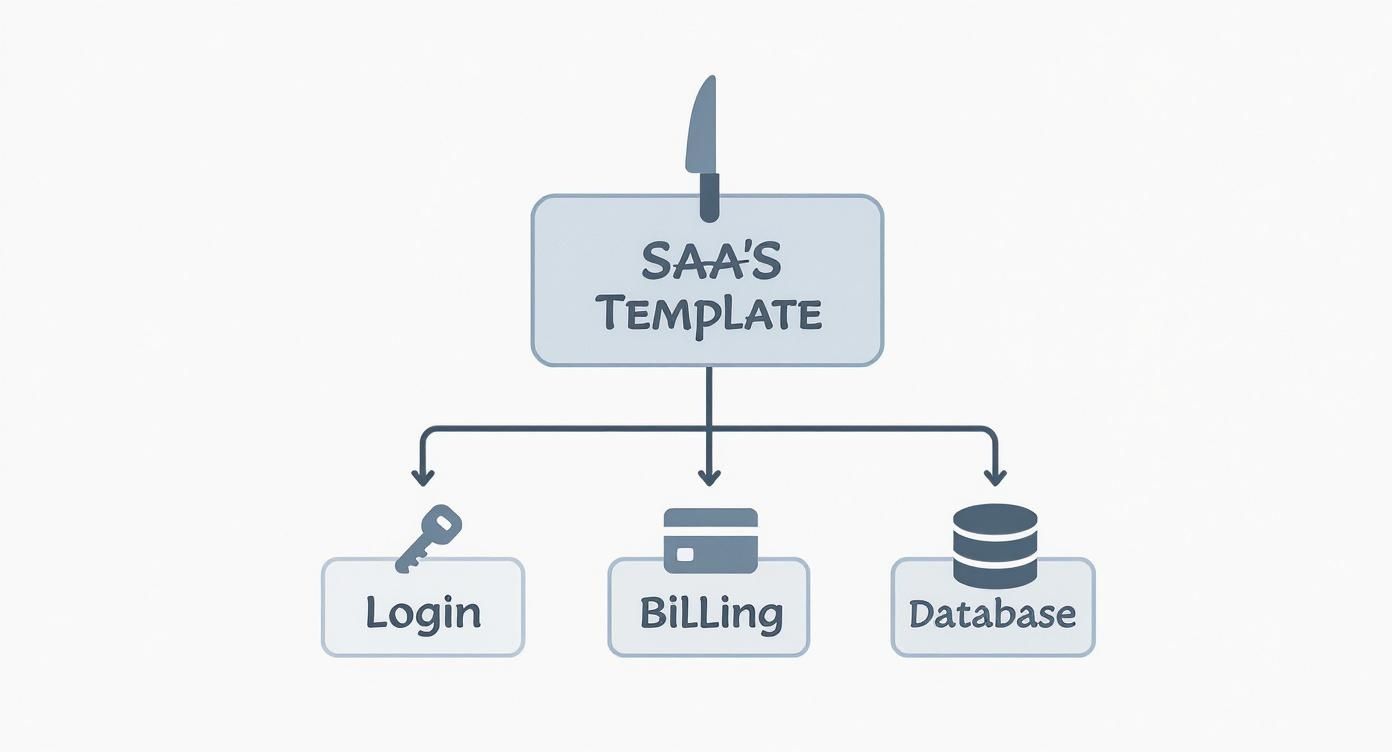
As you can see, things like user management, billing, and the database aren’t just features—they’re the foundation your unique application is built on. Let’s break down why each one is so critical.
Secure Authentication and User Management
Authentication is so much more than a login form. It’s the front door to your entire application, the very first interaction a user has with your product, and the main line of defense for their data. A mediocre template might give you a basic email and password login, but a great one provides a complete, secure, and flexible user management system right out of the box.
Your template’s auth system needs to be solid from day one. Trying to implement security features like two-factor authentication (2FA), password resets, and social logins (Google, GitHub) from scratch is not only a huge time sink but also riddled with potential security holes.
To help you evaluate what’s truly necessary, here’s a quick checklist of the core features a robust SaaS template should provide.
Essential SaaS Template Feature Checklist
| Core Feature | Why It’s Essential | Must-Have Functionality |
|---|---|---|
| Authentication & User Management | This is your app’s front door and first line of defense. Getting it wrong erodes trust and exposes you to risk. | Social Logins (Google, GitHub), Secure Session Management, Role-Based Access Control (RBAC), Team/Organization Support. |
| Subscription Billing Engine | This is how you make money. Billing logic is notoriously complex, and mistakes directly impact revenue and customer trust. | Multiple Pricing Tiers, Free Trials/Freemium Models, Usage-Based Billing Options, Self-Service Customer Portal. |
| Scalable Architecture & Hosting | This determines if your app can grow or if it will buckle under pressure. A weak foundation limits your long-term success. | Production-Ready Hosting Path, Optimized Database Schema, Clean & Developer-Friendly Codebase, CI/CD pipeline. |
By ensuring these core functionalities are in place, you’re not just buying code; you’re investing in a stable, secure, and scalable foundation for your business.
A top-tier template should include:
- Email and Social Logins: Give users multiple, convenient ways to sign up and get into their accounts.
- Secure Session Management: Reliably handle user sessions to keep people logged in securely across different devices.
- Role-Based Access Control (RBAC): Let you define different user roles (like admin, user, or editor) with specific permissions—a must-have for B2B SaaS.
- Team and Organization Support: Allow users to create teams or organizations and invite others, which is the backbone of multi-tenancy.
This foundation builds a secure and smooth user experience, which is absolutely critical for earning trust and keeping customers around. For a concrete example of how these elements come together, you can explore the structure of a complete saas boilerplate that has these features baked in.
A Robust and Flexible Subscription Billing Engine
Let’s be blunt: your billing system is the heart of your business. It’s how you get paid. Handling subscriptions, one-time payments, trials, and different pricing tiers is notoriously difficult. A bug here isn’t just a technical glitch; it directly hits your revenue and breaks customer trust.
A high-quality SaaS template comes with a pre-integrated, production-ready billing system, usually built on a trusted provider like Stripe. This saves you from the nightmare of dealing with payment gateways, webhooks, and compliance standards like PCI.
Look for a template where the billing logic is not just present, but flexible. Your business model will evolve, and your billing system must be able to adapt without a complete rewrite.
Key billing functionalities you should expect include:
- Multiple Pricing Tiers: Support for different subscription plans (e.g., Basic, Pro, Enterprise).
- Free Trials and Freemium Models: The ability to offer trial periods or free plans to hook new users.
- Usage-Based Billing: For products that charge based on consumption, like API calls or data storage.
- Customer Portal: A self-service portal where customers can manage their subscriptions, update payment info, and pull invoices.
By providing a solid billing engine, a template removes one of the biggest and riskiest hurdles in development, letting you focus on your product’s actual value.
Scalable Architecture and Hosting
Finally, the underlying architecture is what decides whether your application can grow or if it will crumble under pressure. A template built on a modern, scalable tech stack is essential for any kind of long-term success. This covers the choice of framework (like Next.js), the database (like PostgreSQL), and the hosting environment.
Scalability isn’t just about handling more users; it’s about maintaining performance as your user base and feature set grow. The reality is that large enterprises with over 1,000 employees account for more than 60% of global SaaS revenue. Being ready for enterprise-level scale from the beginning is a massive advantage.
A scalable template should offer:
- Production-Ready Hosting: A clear, easy path to deployment on a reliable cloud provider with features like continuous integration and delivery (CI/CD).
- Optimized Database Schema: A well-designed database structure that can handle complex queries efficiently as your data grows.
- Developer-Friendly Codebase: Clean, documented, and maintainable code that makes it easy for your team to add new features without creating a mess.
Choosing a template with these must-have features gives you a powerful head start, providing a secure, reliable, and scalable foundation to build your business on.
How to Choose the Right SaaS Template for Your Goals
Picking a SaaS template isn’t like choosing a website theme; it’s a foundational business decision. Get it right, and you’ll fly to market. Get it wrong, and you’re looking at a technical dead-end that bleeds time and money. Think of it as choosing a long-term partner for your product, not just grabbing a temporary piece of code.
To make a smart call, you need to look past a simple feature list. A template can tick all the boxes, but if it doesn’t mesh with your team, your product vision, and your plans for growth, it’s going to hold you back. Let’s break down the critical points to consider so you can choose wisely.
Evaluate the Technology Stack Fit
This is the big one. First and foremost, does the template use languages, frameworks, and databases that your team already knows or is genuinely excited to learn? A template built on a stack your developers have never touched introduces a steep learning curve, completely defeating the purpose of saving time.
Imagine picking a Next.js and PostgreSQL template when your team lives and breathes Laravel and MySQL. You’ll burn weeks just getting everyone up to speed. That friction slows down development to a crawl and turns debugging into an absolute nightmare.
- Team Expertise: Match the template’s stack to your team’s current skills. You want to hit the ground running from day one.
- Hiring Pool: Think ahead. How easy will it be to hire developers for this stack as you grow? A niche stack can become a hiring bottleneck.
- Community and Ecosystem: A popular, well-supported stack comes with a massive library of documentation, open-source packages, and community forums to help you solve problems fast.
Prioritize Customization and Flexibility
A good SaaS template gives you a strong foundation, not a rigid cage. The whole point is to handle the 80% of common, boilerplate features so you can pour your energy into the unique 20% that makes your product special. Before you commit, you have to figure out how easy it is to tweak, extend, or even rip out parts of the template.
Can you easily swap out the user interface? Is the billing logic modular enough to handle a pivot to a new pricing model? A template with tangled, poorly documented code will fight you at every turn, transforming simple tweaks into week-long projects.
A great template should feel like a set of high-quality building blocks, not a pre-fabricated house you can’t renovate. You need the freedom to build your vision on top of its foundation.
Scrutinize Documentation and Support
When you hit a wall at 2 AM on a Tuesday, excellent documentation is your best friend. A template without clear, comprehensive guides is a black box—and a recipe for frustration. Look for detailed setup instructions, walkthroughs of the core architecture, and practical examples of how to extend key features.
But static docs are only half the story. What does the human support system look like?
- Active Community: Is there a Discord or Slack channel where you can ask questions and get real answers from other users who’ve been in your shoes?
- Developer Responsiveness: Check out the project’s GitHub repository. Are issues being addressed in a timely manner? Are the creators actually active and helpful?
- Paid Support Options: For business-critical projects, having a direct line to priority support can be an absolute lifesaver.
This is one area where a little research upfront pays huge dividends. To get a better sense of what a well-supported option looks like, check out our guide on finding the best SaaS starter kit for your project.
Assess Scalability and Licensing
Finally, you have to think about the future. A template that works beautifully for your first ten customers might just fall apart under the load of ten thousand. Dig into its architectural patterns. Does it use a database known for scaling? Is the path to more robust hosting clear and well-trodden? According to research from Vena Solutions, the average organization manages over 100 SaaS applications as it scales, so ensuring your own product is built on solid ground is critical for survival.
And please, read the license. Don’t just skim it. Most templates use a standard, permissive license like MIT, but some have weird restrictions on commercial use or demand attribution. A hidden clause can become a massive legal headache later on. Make sure the license aligns with your business goals before you write a single line of your own code.
Common Mistakes to Avoid When Using a SaaS Template

A great SaaS template feels like a superpower. It can slash your development time and get you from idea to launch faster than you thought possible. But treating it like a magic wand that solves every problem is a recipe for frustration.
Learning to avoid a few common traps can be the difference between a smooth launch and a project that completely stalls out. These are the hard-won lessons from countless developers who’ve walked this path before. Nail these, and your template will be a true asset, not a source of technical debt.
Underestimating Customization Time
This is the big one. It’s so easy to see a feature-packed template and think you’re basically at the finish line. In reality, you’re at the starting line, just with a massive head start.
A solid SaaS template handles the foundational 80% of your application—the repetitive, boilerplate stuff like user auth and subscription logic. Your real job is to build the unique 20% that actually delivers value to your customers. This is where the real work begins, and it always takes longer than you think. You’ll need to weave in your business logic, customize the UI, and build out your core features.
A SaaS template gives you a massive head start, but it doesn’t run the race for you. Budget your time and resources for customization as a major phase of your project, not an afterthought.
Treating the template as a simple plug-and-play solution leads to rushed work and blown deadlines. Instead, see it for what it is: a powerful accelerator that lets you focus on innovation, not a shortcut that eliminates the need for development.
Ignoring the Documentation
It’s so tempting to just dive into the code and start tinkering. Don’t do it. Ignoring the documentation that comes with your SaaS template is a costly, self-inflicted wound. A well-documented template is a map to the entire codebase, explaining architectural decisions, setup steps, and how to extend core functions without breaking things.
Skipping this step means you’ll spend hours, or even days, reverse-engineering logic that was laid out for you. You might implement a feature in a way that clashes with the template’s design, creating a tangled mess that’s a nightmare to debug later.
- Read the setup guide first: Get a handle on the dependencies, environment variables, and initial configuration.
- Review the architecture overview: Understand how the different pieces—like auth, billing, and the database—all connect.
- Consult feature-specific docs: When you’re ready to tweak billing or add a new user role, check the docs for the recommended way to do it.
A few hours reading the docs upfront will save you from countless hours of frustration down the road. It’s the highest-leverage activity you can do at the start.
Choosing an Outdated Tech Stack
Finally, not all templates are created equal. Choosing a template built on an aging or poorly supported tech stack is like building a house on a crumbling foundation. It might look fine at first, but it will cause huge problems as soon as you try to scale.
An outdated stack can expose you to security vulnerabilities, create performance bottlenecks, and shrink the pool of developers who even know how to work on it. Make sure the template uses modern, well-maintained technologies with active communities. This ensures you’ll have access to updates, security patches, and plenty of resources to help you solve problems as your application grows.
The Future of Development with AI-Powered SaaS Templates
Software development never sits still, but the next big shift isn’t just another framework—it’s intelligence baked right into the foundation of your app. Artificial intelligence has moved from a buzzword to a practical tool, and it’s fundamentally changing what a SaaS template can do.
We’re seeing a new generation of smart SaaS templates emerge. Instead of just giving you boilerplate code for logins and billing, these advanced starters come loaded with AI-powered features from day one. The goal is to help you build a smarter, more competitive product right out of the gate.
What AI Integration Actually Looks Like
Imagine starting your project not just with a user authentication system, but one that has AI-driven fraud detection built-in. Or a billing engine that doesn’t just process payments, but uses predictive analytics to flag customers who are likely to churn.
This is the new baseline for a quality saas template. These templates treat AI as a core component, not an afterthought, offering features that used to be out of reach for anyone but the big tech players.
You’ll find capabilities like these baked in:
- Intelligent Analytics: Dashboards that go beyond showing data to actually surfacing insights and recommending what to do next.
- AI-Driven Onboarding: User onboarding flows that adapt in real-time to a user’s actions, guiding them to that “aha!” moment much faster.
- Predictive Churn Models: Early warning systems that alert you to accounts showing signs of cancellation, giving you a chance to step in.
- Automated Content Generation: Built-in tools for whipping up marketing copy, user notifications, or even drafts for your support docs.
These aren’t just time-savers. They give founders a real strategic advantage, letting them compete on intelligence, not just on a long list of features.
Choosing an AI-ready template today is a strategic move to future-proof your application. It’s about building a product that can learn, adapt, and create a more personalized experience for your users from its very first launch.
A Decisive Competitive Edge
This isn’t just a niche trend; it’s a market-wide shift. Industry analysis shows that around 50% of SaaS companies are planning to embed AI into their platforms for things like automation and custom user experiences. AI’s impact on the bottom line is already huge, driving a significant chunk of the SaaS market’s growth. You can dig into more of these stats and trends over at UserGuiding’s SaaS industry report.
When you start with a saas template that’s already built for AI, you’re positioning your product for where the market is headed. Your team can stop worrying about reinventing the wheel and focus on your unique business logic, while still delivering a top-tier user experience powered by pre-built AI components.
This approach gives you a clear advantage in a few key ways:
- Faster Innovation: You can roll out sophisticated AI features without the massive upfront cost and time sink of building them from scratch.
- Deeper User Insights: You get instant access to predictive models and analytics that help you understand your users on a much deeper level.
- Enhanced User Engagement: Personalized experiences, smarter recommendations, and automated support create a product that users want to stick with.
The future of SaaS is intelligent. By choosing a foundation like saasbrella, which is designed for AI-assisted development from the ground up, you’re not just building an app faster—you’re building a smarter one that’s ready to win.
Still Have Questions About SaaS Templates?
Even after seeing all the benefits, a few questions might still be nagging you. That’s a good thing. Picking a SaaS template is a big decision, and it’s smart to get every doubt out of the way before you jump in.
This section is all about tackling the most common questions we hear from founders and developers. Let’s get you the direct answers you need to move forward with total confidence.
Does a SaaS Template Limit Creativity?
This is probably the #1 concern we hear, and it’s a fair one. The short answer? No. A good template doesn’t limit creativity; it unleashes it by getting the boring, repetitive work out of your way.
Think of it less like a paint-by-numbers kit and more like a professional artist’s pre-stretched canvas. The template handles the tedious but critical foundation—user logins, billing hooks, team invites—freeing you up to pour all your energy into the unique features and brilliant UI that will make customers fall in love with your product. You’re not stuck building another password reset form; you’re building your actual business.
A well-designed SaaS template removes constraints, it doesn’t add them. By solving the universal problems, it liberates your most valuable resource—your time—to focus on true innovation.
How Do You Handle Template Updates?
Great question. Maintenance is critical. You don’t want to be stuck on an outdated foundation. High-quality templates get regular updates to fix bugs, patch security holes, and keep up with new versions of the tech they’re built on. The process usually feels a lot like managing any other software dependency.
Typically, you’ll pull the latest changes from the template’s Git repository and merge them into your project. This is why it’s so important to choose a template with a clean, modular codebase—it makes merging updates smooth and helps you sidestep those messy merge conflicts that can ruin your day.
When Is Building From Scratch Better?
Look, while a SaaS template is a massive head start for most projects, there are absolutely times when building from the ground up is the right call. If your app has truly bizarre architectural needs that just don’t fit the standard SaaS model, a template might cause more headaches than it solves.
You should probably build from scratch if:
- Your core product is a new kind of infrastructure itself, like a novel database or a unique queuing system.
- You’re dealing with extreme security or compliance demands (think FedRAMP or HIPAA) that require every single line of code to be custom-built and audited.
- Your team is locked into a highly specialized, pre-existing internal platform they absolutely must use.
For the other 99% of SaaS ideas, though, starting with a production-ready template is the smarter, faster, and more capital-efficient way to get to market.
Ready to stop reinventing the wheel and start building your actual product? saasbrella gives you a secure, scalable, and AI-ready foundation so you can launch in days, not months. Get started for free and see just how fast your idea can become a reality.