Build Faster with a SaaS Starter Kit
So, what exactly is a SaaS starter kit?
Think of it as the ultimate launchpad for your software idea. It’s a production-ready foundation that comes with all the essential, non-negotiable features already built—things like user authentication, subscription billing, and team management.
It’s like getting the keys to a brand-new, fully-equipped commercial kitchen. You can skip the months of construction, plumbing, and wiring and get straight to what you do best: crafting a unique and delicious menu.
Why a SaaS Starter Kit Is Your Secret Weapon
Let’s stick with that restaurant analogy for a second.
If you were opening a new restaurant, you could spend your first six months learning how to forge an oven, wire the building for electricity, and install all the plumbing yourself. But why would you? Your genius is in the food, not the infrastructure.
A SaaS starter kit gives you that same massive head start. It’s not just a pile of code; it’s a strategic advantage that clears the path from your first line of code to your first paying customer. It handles all the repetitive, undifferentiated grunt work that every single SaaS needs but that offers zero unique value to your users.
The Grin-and-Bear-It of Starting from Scratch
Every SaaS product, no matter how niche, needs a core set of features just to open its doors.
We’re talking about:
- User Authentication: Secure sign-ups, logins, “forgot password” flows, and maybe even social logins.
- Subscription Billing: Integrating a payment gateway like Stripe to manage different plans, invoices, and trials.
- Team Management: Letting users invite their colleagues and set different access levels.
- Database Setup: A properly configured, scalable database that’s ready for your application’s data from day one.
Building all of this from the ground up is a huge time and money sink. It’s also riddled with security landmines. For a startup, that means burning through your runway and delaying the critical feedback you need from real customers.
The global SaaS market is currently valued at around $390.5 billion and is expected to rocket to $793.1 billion by 2029, growing at an aggressive 19.38% annually. In a market moving that fast, speed isn’t just a feature; it’s a survival mechanism. You can find more details on this explosive growth at SellersCommerce.com.
Starter Kit vs. Boilerplate: Not All Shortcuts Are Created Equal
It’s easy to lump starter kits and boilerplates together, but they are fundamentally different tools for different jobs.
A boilerplate is like getting a flat-pack box with a high-end oven, fridge, and mixer inside. The parts are great, but you still have to assemble them, run the power, connect the gas, and hope they all work together without blowing a fuse. It saves you from manufacturing the appliances, but the heavy lifting of installation and integration is all on you.
We actually have a whole guide comparing a starter kit to a SaaS boilerplate if you want to dive deeper.
A SaaS starter kit, on the other hand, is the fully installed, inspector-approved kitchen. The power is on, the water is running, and the ovens are pre-heated. You can walk in and start cooking immediately.
This is the key difference. A starter kit isn’t just code; it’s a deployed, secure, and maintainable system. It lets you stop wrestling with infrastructure and start focusing on innovation. It’s the difference between starting your race on the 50-yard line versus starting way back in your own end zone.
Comparing Development Approaches
To put it all in perspective, here’s a quick rundown of how a starter kit stacks up against a boilerplate and a completely custom build.
| Attribute | SaaS Starter Kit | Boilerplate | Custom Build |
|---|---|---|---|
| Speed to MVP | Days to a few weeks | Weeks to a few months | Months to a year+ |
| Upfront Cost | Low (subscription/one-time) | Very Low (often open-source) | Very High (dev salaries) |
| Initial Focus | Product features & UX | Infrastructure setup & integration | Everything from scratch |
| Maintenance | Low (often managed) | Medium to High | Very High |
As you can see, each approach has its place. But for founders who need to move fast without compromising on quality, a starter kit hits that perfect sweet spot between speed and stability.
The Core Components of a Modern Starter Kit
To really get what makes a great SaaS starter kit so powerful, you have to look under the hood. It’s not just a random bag of features. It’s a complete, cohesive system where every part is engineered to solve a specific, painful problem that every single SaaS founder runs into.
Think of it like getting the engine, transmission, and chassis of a high-performance car, all pre-built and perfectly tuned to work together right out of the gate. These aren’t just nice-to-haves; they represent hundreds of hours of development and countless decisions you now get to skip. This frees you up to focus on the custom bodywork and unique features that make your car—your SaaS—stand out.
The chart below shows how different development paths—using a starter kit, a boilerplate, or a custom build—all branch out from the same goal: creating a SaaS product.
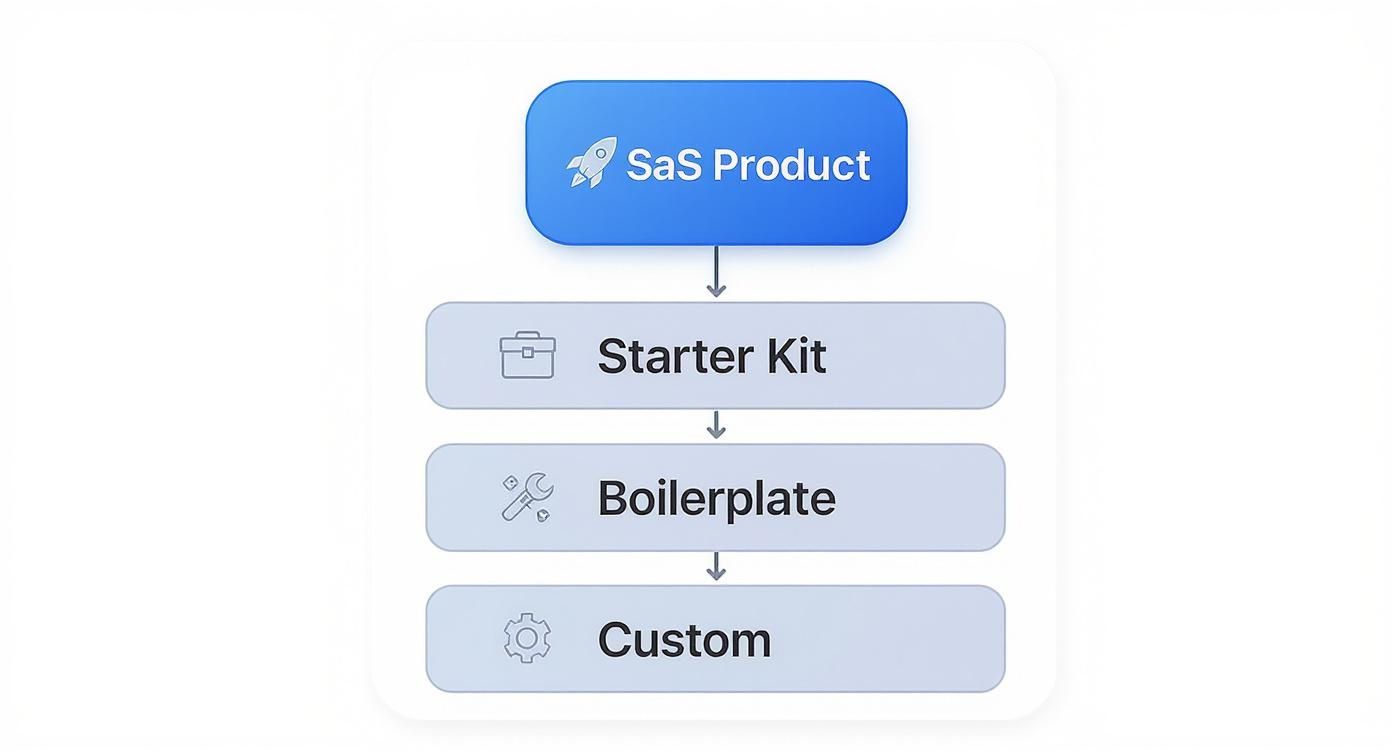
As you can see, all roads lead to a finished product. But a starter kit gives you the most structured and accelerated route, packing in integrated systems that you’d otherwise have to build from the ground up with a boilerplate or custom approach.
Secure User Authentication
The front gate to any SaaS is user authentication. This is way more complicated than just slapping a login form on a page. Today’s users expect a secure, seamless experience, and building this from scratch is a minefield of security risks. A solid starter kit hands you a complete authentication system on day one.
This usually includes:
- Email & Password Login: The basics—secure registration, login, and password reset flows that are already battle-tested.
- Social Logins: Pre-configured OAuth for providers like Google, letting users sign up with a single click. Easy win.
- Multi-Factor Authentication (MFA): A critical security layer that users are starting to demand. Implementing this correctly involves surprisingly complex logic.
Messing up authentication can expose your app and your users to huge risks. A pre-built system saves you from the headache of becoming a security expert overnight.
Automated Subscription Management
Let’s be honest, the lifeblood of your SaaS is getting paid. While plugging into a payment processor like Stripe is the first step, building a full-blown subscription management system is a whole different beast. A great starter kit comes with this entire financial engine pre-installed.
A starter kit’s billing module should do more than just take a credit card. It should manage the entire customer lifecycle, from trial to upgrade to cancellation, without you writing a single line of backend billing code.
This means it handles tiered pricing, sends out automated invoices, manages subscription upgrades or downgrades, and even deals with messy situations like prorated billing when a customer changes their plan mid-cycle.
Scalable Database and Multi-Tenancy
As you get more users, your database and architecture need to keep up without falling over. A well-designed starter kit gives you a pre-configured database setup, often using an Object-Relational Mapper (ORM) like Prisma to make database interactions safer and more intuitive.
Even more important, it establishes a multi-tenancy architecture from the very beginning. This is the magic that keeps one customer’s data completely separate from another’s—an absolute must-have for security and compliance. Trying to bolt this on later is a nightmare. If you want to go deeper, you can learn more about multi-tenant SaaS architecture in our guide. A starter kit that includes this ensures your app is built on a scalable and secure foundation from its first line of code.
Effortless Deployment Pipelines
Finally, a killer product is useless if you can’t get it into the hands of your users reliably. Setting up modern deployment pipelines—the automated process that takes your code, runs tests, and pushes it live—can be a massive DevOps headache.
A modern starter kit will often include pre-configured deployment scripts for popular hosting platforms. For instance, saasbrella gives you instant git-push deployments, handling the entire CI/CD process for you. This means you can push an update and see it live in minutes, not hours, without ever having to fight with server configurations or cryptic YAML files. It’s a game-changer for keeping momentum and shipping fixes fast.
Gaining a Competitive Edge with AI Integration
In today’s market, a great idea is just the starting line. The real race is won by launching with smart, automated features that customers actually want. This is where a modern SaaS starter kit stops being a simple foundation and becomes a launchpad—letting you build an AI-powered business from day one.
Forget spending the first few months bogged down in boilerplate code. With the right kit, you start with a framework that’s already wired for intelligence. That frees up your best engineers to do what they do best: build the unique, AI-driven features that will make your product stand out.
This isn’t just some passing trend. It’s a fundamental shift in how successful software gets built. The data is clear: AI-native SaaS startups are crushing traditional companies in growth across the board. You can dig into these AI SaaS statistics and trends to see just how big this shift really is.
Launching with Sophisticated AI Features
Imagine trying to build an AI chatbot for customer support from absolute scratch. You’d need a team of machine learning experts, mountains of training data, and a serious chunk of cash. For a new startup, that’s a non-starter.
A quality starter kit completely flips the script. It gives you all the necessary plumbing to plug directly into powerful AI APIs, letting you roll out sophisticated features with a tiny fraction of the usual effort.
What does that look like in practice?
- Intelligent Support Chatbots: Instead of building a model from the ground up, you can easily connect to services like OpenAI or Anthropic to offer your customers instant, genuinely helpful support.
- Generative Content Tools: Give your users the ability to generate AI-powered report summaries, email drafts, or creative content right inside your app.
- Smart Analytics Dashboards: Move beyond basic charts. Integrate AI that can automatically spot trends, flag anomalies, and deliver predictive insights that your users will love.
A SaaS starter kit basically democratizes access to advanced tech. It gives a small, scrappy team the power to launch a product that feels just as smart and polished as something built by a huge, well-funded competitor.
That’s a massive strategic advantage. You’re not just getting to market faster; you’re launching smarter, with features that scream high value from the moment a user signs up.
Building Automation into Your Core Operations
It’s not just about flashy, customer-facing AI. A great starter kit also weaves automation deep into the operational fabric of your business. This is the unsung hero of scalability—a powerful advantage that ensures your business runs like a well-oiled machine, even as you grow.
Think of it like having an automated pit crew for your SaaS. While you’re focused on winning the race, these systems are in the background, keeping the engine tuned and running at peak performance. They handle the critical but repetitive work that would otherwise drain your time and energy.
Here are a few examples of this built-in operational magic:
- Automated Deployment Scripts: With a solution like saasbrella, a simple
git pushis all it takes to kick off a complete deployment pipeline. It runs your tests and pushes the code live, no manual server wrangling required. - Background Job Processing: Offload heavy lifting like generating massive reports or sending out a thousand emails to background workers. This keeps your main application snappy and responsive for users.
- Triggered User Onboarding: Set up an automated sequence of welcome emails that guide new users toward their “aha!” moment, all based on their actions within the app. No manual outreach needed.
This level of automation isn’t just a time-saver. It slashes the risk of human error, makes your service more reliable, and lets you run a lean team even as your user base explodes. By having these systems in place from day one, you’re building a smarter, more resilient, and far more competitive business.
How to Choose the Right SaaS Starter Kit
Picking a SaaS starter kit is a huge decision. Seriously. It’s not just a tool; it’s the foundation you’ll be building on for years. Get it right, and you’ve got a massive head start. Get it wrong, and you’re stuck with a frustrating bottleneck that will cost you time and money down the line.
You have to look past the slick landing pages and really dig into the architecture. Let’s break down how to methodically compare your options and find the one that fits your long-term vision, not just your immediate need to get something—anything—launched.
Your SaaS Starter Kit Evaluation Checklist
To make this process less overwhelming, I’ve put together a checklist. Use this as your guide when you’re comparing different starter kits. It forces you to think through the critical technical and business aspects before you commit.
| Evaluation Criteria | Key Questions to Ask | Your Rating (1-5) |
|---|---|---|
| Technology Stack Fit | Does it use a language/framework my team already knows well? (e.g., Next.js, Node.js) | |
| Scalable Architecture | Is multi-tenancy built-in? Does it use a scalable database like PostgreSQL? | |
| Core SaaS Features | Does it include production-ready auth, billing (Stripe), and team management? | |
| Extensibility | How easy is it to add my own custom features without fighting the kit’s structure? | |
| Code Quality | Is the code clean, well-documented, and easy for a new developer to understand? | |
| Deployment & DevOps | Does it offer a simple, one-click deployment process or do I need to set up my own CI/CD? | |
| Community & Support | Is there an active Discord or forum? Is paid support available for critical issues? | |
| Long-Term Viability | Is the project actively maintained? How often are updates and security patches released? |
After you’ve rated a few options, you’ll have a much clearer picture of which one truly aligns with your goals. Now, let’s dive deeper into what these criteria actually mean.
Align with Your Technology Stack
This one is the most basic, yet most important, filter. A starter kit with a million features is completely useless if your team can’t work with it. If your devs live and breathe Next.js, choosing a kit built on Laravel or Python is just asking for trouble. You’ll wipe out any speed advantage with a steep, painful learning curve.
Stick with what your team knows. A familiar framework means they can start building immediately, customize with confidence, and fix bugs without pulling their hair out. It’s not about finding the “best” tech stack in the world; it’s about what’s best for your team today.
- Front-End Framework: Is it something your team is productive with, like Next.js, Nuxt, or SvelteKit?
- Back-End Language: Are you comfortable with the back-end, like TypeScript/Node.js, PHP, or Python?
- Database & ORM: Does it use a solid database like PostgreSQL and an ORM like Prisma that you trust to scale?
Nailing this first step is critical. Everything else builds from here.
Evaluate Scalability and Architecture
Your starter kit needs to work on day one, but more importantly, it needs to work on day 1,000. When your user count jumps from 10 to 10,000, the last thing you want is a complete architectural meltdown. This is where you have to look under the hood.
The single biggest architectural pattern to look for is multi-tenancy. If the kit has this from the start, it means it was designed to keep customer data separate and secure—a total non-negotiable for any B2B SaaS. Bolting this on later is an absolute nightmare.
A great starter kit doesn’t just help you build an MVP; it gives you an MVP that’s architecturally sound and ready to scale. It anticipates future needs so you don’t have to rebuild your foundation when you should be celebrating growth.
Look for other signs of a solid design: efficient database schemas, stateless logic, and support for background jobs. These are the tell-tale signs that experienced engineers built the kit, people who’ve felt the pain of scaling before.
Ensure Extensibility and Customization
Let’s be real: the whole point of a starter kit is to handle the boring, repetitive stuff so you can focus on the unique features that make your product special. That means the kit has to be easy to extend. You need to be able to build your secret sauce on top of it without constantly fighting the framework.
A good kit provides a solid foundation but then gets out of your way. The code should be clean, well-organized, and actually documented. This makes it a breeze for your developers to jump in, add a new API endpoint, or integrate a third-party service.
Before you pull the trigger, ask yourself:
- How hard is it to add a new database table and the API to go with it?
- Can I easily swap out the UI components to match my brand?
- Does the documentation give clear examples for extending core features?
If a kit is too rigid or “opinionated,” you’ll end up spending more time on workarounds than on building your product. That defeats the entire purpose.
Check for Community and Support
No matter how great the kit is, you will run into a problem you can’t solve. It’s inevitable. When that moment comes, having access to help is priceless. The quality of the community and official support can be the difference between a minor speed bump and a multi-day roadblock.
Check for an active community on places like Discord or GitHub Discussions. A busy forum is a great sign of a healthy, maintained project. Also, see if the creators offer paid support. It can be a lifesaver when you’re facing a hard deadline. A platform like saasbrella goes a step further by offering direct onboarding and support, making sure you’re never left stranded.
Alright, you’ve done the hard work of evaluating the options and picked your SaaS starter kit. Congratulations! The foundation is laid. Now it’s time to build your unique product on top of that rock-solid base.
This isn’t about starting from a blank page. Think of it like moving into a beautifully designed model home. The structure, plumbing, and electricity are all perfect and up to code. Your job is to paint the walls your color, bring in your furniture, and add the personal touches that make it yours.
This guide is your roadmap to do just that, step-by-step, from the initial download to deploying your first custom feature.

Phase 1: Initial Setup and Configuration
First things first, let’s get the kit running on your local machine. This is a critical first step—a quick sanity check to make sure all the parts are in place and the core application works as advertised. Any good starter kit will have dead-simple instructions for this.
You’ll typically start with a few basic commands:
- Cloning the Repository: Just a simple
git cloneto pull the code down to your computer. - Installing Dependencies: Running a command like
npm installto grab all the necessary packages and libraries the kit relies on. - Configuring Environment Variables: This is where you’ll plug in your own keys. You’ll edit a
.envfile to connect to your database, payment gateway (like Stripe), and email service.
Nailing this setup gives you a stable local environment that perfectly mirrors what you’ll have in production. That makes building and debugging way, way smoother down the line.
Phase 2: Branding and Customization
Okay, the engine is running. Now it’s time to give it your own paint job. This is where you swap out all the generic placeholders and infuse your company’s identity into the application. It’s the step that transforms the kit from a template into your product.
Your main branding tasks will involve:
- Updating Logos and Favicons: Get your logo on the navigation bar, login pages, and in the browser tab.
- Customizing Email Templates: Tweak the copy in the welcome emails, password resets, and invoices so they sound like they’re coming from you.
- Adjusting Color Schemes and Fonts: A few changes in the CSS files to align the entire UI with your brand guidelines.
This isn’t just about making things look pretty. A consistent brand experience builds trust from the moment a user signs up and makes your application feel polished and professional.
Phase 3: Integrating Your Unique Logic
This is where the real fun begins. The starter kit has handled all the boring, repetitive stuff. Now you’re free to focus 100% of your energy on your “secret sauce”—the unique features that actually solve your customers’ problems. For a deeper look into this part of the journey, our guide on how to build a SaaS application from scratch is a great next read.
Your main goal here is to build on top of the starter kit, not fight against it. Use its existing components for authentication, database access, and billing to give yourself a massive head start.
This is the creative part. Whether you’re building a new analytics dashboard, an AI-powered writing tool, or a project management workflow, you can pour all your attention into that core functionality.
One last piece of advice: plan for the future. As you build, try to keep your custom code separate from the kit’s core files whenever possible. This simple practice will make it infinitely easier to pull in updates and security patches from the kit’s maintainer without getting stuck in a nightmare of code conflicts. It’s the key to keeping your app secure and modern long after you launch.
Common Pitfalls and How to Avoid Them
Jumping on a SaaS starter kit can feel like you’ve found a shortcut to launch day, but it’s not always a straight path. A few common mistakes can turn that shortcut into a long, winding detour. Let’s walk through what they are so you can sidestep them completely.
The biggest trap I see founders fall into is picking a kit based on its popularity, not on what their team actually knows. If you grab a starter kit built on a tech stack your developers have never touched, you’ll wipe out all those time savings. You’ll spend weeks just getting up to speed, and the initial excitement will quickly turn into frustration. Always start with a foundation your team can build on with confidence.
Underestimating the Learning Curve
Even when you pick a familiar stack, don’t assume you can hit the ground running on day one. Every starter kit has its own way of doing things—its own architecture and conventions. It’s easy to underestimate how much time it takes to really understand how all the pieces, like auth and billing, are wired together.
The goal isn’t just to use the kit. It’s to internalize its structure so you can extend it without accidentally breaking something. Rushing this part is a classic recipe for messy code and technical debt that will absolutely haunt you later.
Give your team some breathing room. Block out dedicated time to explore the codebase, read the docs, and really get the “why” behind its design before a single line of your own product logic is written. It’s an upfront investment that pays off almost immediately.
Neglecting Long-Term Maintenance and Retention
Another blind spot is thinking only about launch day. What happens a year from now? You need a clear plan for handling updates and security patches from the kit’s creators. Ignoring them is like leaving your front door unlocked; you’re just asking for trouble. Make sure you choose a kit with a solid update process and an active community or support you can lean on.
Beyond the code, your kit needs to help you keep the customers you worked so hard to get. We’re in an era of app consolidation—customers are cutting back. The average B2B SaaS churn rate is already 3.5%, and with companies using fewer apps overall, a clunky experience will get you booted fast. Your starter kit has to lay the groundwork for features that create a sticky product, like smooth onboarding, user analytics, and easy feedback channels. If you want to dive deeper into these trends, you can review recent SaaS statistics at Hostinger.com.
This is exactly why we built saasbrella as a managed solution. It handles the ongoing maintenance and gives you a powerful foundation designed for customer retention from the start. You get to focus on building features that solve real problems, knowing the platform underneath is secure, scalable, and ready for the long haul.
Common Questions Answered
Even after getting the gist of what a SaaS starter kit does, most founders and developers have a few lingering questions before they’re ready to jump in. Let’s tackle the most common ones head-on so you can move forward with confidence.
| Question | Short Answer |
|---|---|
| Can a starter kit handle enterprise scale? | Yes, if you pick the right one. A well-architected kit is built for scale from day one. |
| How much can I customize it? | A good kit should feel like a foundation, not a cage. You get full control over your unique features and UI. |
| What happens when the kit gets updated? | Reputable providers offer clear update paths, usually involving merging changes from a source repository. |
| Can I switch to a different kit later? | Realistically, no. It’s a core architectural decision, so a switch is more like a complete rewrite. |
Let’s dive a little deeper into each of these.
Can a Starter Kit Handle Enterprise Scale?
Absolutely—but this is where you have to do your homework. The best starter kits are engineered for growth right from the start, using proven practices for things like database management, cloud deployments, and multi-tenancy.
The key is to verify that its foundation can truly support enterprise-level demands for security, compliance, and performance. Look for kits built on robust tech like PostgreSQL and those with a clear, documented strategy for horizontal scaling. Don’t just take their word for it; dig into the architecture.
How Much Can I Customize a Starter Kit?
A high-quality starter kit is built for customization. Think of it less like a rigid template and more like a solid, unopinionated foundation that takes care of the boring, repetitive work for you.
The core plumbing—authentication, billing, team management—is already built and tested. This frees you up to put 100% of your focus on building the unique application logic and user interface that your customers will actually pay for. The best kits offer clean, well-documented code that makes this process feel natural, not like you’re fighting the system.
A starter kit’s job is to accelerate your development, not restrict it. If you find yourself constantly fighting the kit’s structure to add your features, it’s not the right fit for your project.
What Happens When the Kit Is Updated?
This is a critical question. Any reputable SaaS starter kit provider will have a clear, documented process for handling updates. Usually, this means pulling changes from the original source repository and carefully merging them into your custom codebase.
This is exactly why choosing a well-maintained kit with an active community or solid paid support is so important. It ensures you can benefit from new features, bug fixes, and security patches without grinding your own development to a halt.
Can I Switch to a Different Kit Later?
Trying to switch starter kits after you’ve already built out your product is almost never a good idea. It’s not like swapping out a single component; it’s more like trying to replace the entire foundation of a house that’s already been built. Your whole product—every feature, every line of custom code—is intertwined with that initial architecture.
That’s why picking the right kit from the start is so vital. It’s a long-term technical commitment that will define how your product evolves for years.
Ready to skip the setup and focus on building your unique product? saasbrella provides a deployed, secure, and maintainable foundation with all the core features you need, including AI-ready integrations and one-click deployments. Start your 14-day free trial today.
Ready to build?
Get Started for Free. Build on a production-ready foundation with authentication, database, and deployment already configured.
No credit card required. Cancel anytime.